


Search for your own business on your phone. Nothing shows up. Meanwhile, three competitors sit on the map, collecting calls and direction requests. If that sounds familiar, you’re not alone. Many Austin businesses are invisible on Google Maps, and most owners never find out why.
The good news: the cause is usually fixable. Below, we walk through the most common reasons a business disappears from Google Maps, how to diagnose each one, and when professional GMB services in Austin, Texas make sense. (GMB stands for Google My Business, which Google now calls Google Business Profile. We use both names because people still search for both.)
In this guide
- How Google decides which businesses appear on Maps
- Six common reasons your business is missing
- How to check whether your listing is missing
- What GMB services in Austin, Texas include
- How your website affects your Maps ranking
- How long it takes to show up
- Frequently asked questions
How Does Google Decide Which Businesses Appear on Google Maps?
Google ranks local results using three main factors: relevance, distance, and prominence. Relevance means how well your profile matches the search. Distance means how close you are to the searcher. Prominence means how well known your business is, based on reviews, links, and mentions across the web.
You can’t control distance. A searcher on South Congress sees different results than someone in Round Rock. But you can control relevance and prominence. A complete, accurate profile builds relevance. Reviews, directory listings, and a strong website build prominence. Together, they decide whether you land in the local pack, the map with three listings at the top of many searches. Google explains these factors in its guide to improving your local ranking.
Practical tip: Search your main service plus “near me” from your phone while standing at your office. Then repeat the search from a few miles away. The difference shows how much distance shapes your results and which areas you need to work harder to reach.
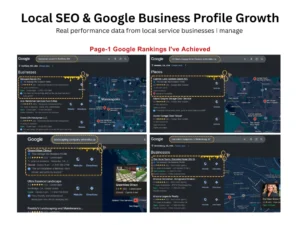
Google Maps local pack showing three Austin business listings for a service search
Why Is Your Austin Business Missing From Google Maps? Six Common Causes
Most missing listings come down to six problems: the profile is unverified, it’s suspended, the categories or service area are wrong, business details don’t match across the web, reviews are thin, or the website doesn’t back up the listing. Each one is fixable, but each needs a different solution.
1. Your profile isn’t claimed or verified
Google generally needs to confirm that you run the business before it shows your profile to customers. Unverified profiles rarely appear in Maps results. Verification can take anywhere from a few minutes to about two weeks, depending on the method. Tip: Log in to your Google Business Profile and look for a “Get verified” prompt. Finish that first, before you change anything else.
2. Your profile is suspended or flagged
Google can suspend a profile that breaks its rules. Common triggers include a keyword-stuffed business name, a virtual office or P.O. box address, or an ineligible business type. Suspended profiles disappear from Maps. Review Google’s guidelines for representing your business, fix the violation, then submit a reinstatement request with proof, such as a business license or storefront photos.
3. Your categories, name, or service area are wrong
Your primary category tells Google what you do. A plumber listed under a vague category competes poorly against one listed as “Plumber.” The same goes for service areas. If you visit customers at their homes, hide your address and list the Austin neighborhoods and suburbs you actually serve. Use your real business name only, with no added keywords.
4. Your business details don’t match across the web
Google cross-checks your name, address, and phone number (NAP) against directories like Yelp, the Better Business Bureau, and Apple Maps. Mismatches create doubt. “Suite 200” on one site and “Ste 200” on another can matter. Pick one format and use it everywhere, including your website footer.
5. You have few reviews, or none recent
Reviews are a major prominence signal. A profile with two reviews from 2022 looks inactive next to a competitor with fresh, detailed feedback. Ask every happy customer for a review and reply to each one. Never buy reviews or offer rewards for them. Google can remove fake reviews and penalize the profile that collected them.
6. Your website doesn’t support your listing
Your Business Profile and your website work as a team. If your site has no Austin-specific content, no matching contact details, and slow mobile pages, Google has less reason to trust your listing. We cover how to fix this in the website section below.
How Can You Check Whether Your Business Is Actually Missing?
Search your exact business name in Google Maps first. Then search your service plus “Austin, TX” from a few different locations. If you appear for your name but not for your service, you have a ranking problem. If you don’t appear at all, you likely have a verification, suspension, or listing problem.
Run these five checks to narrow down the cause:
- Search your business name and “Austin” in the Google Maps app on your phone.
- Search your main service plus “Austin, TX” in a private browser window.
- Open your Google Business Profile dashboard and look for verification or suspension notices.
- Zoom in on your listing and confirm the map pin sits on your real location.
- Use a geo-grid rank tracker to see how you rank across different parts of your service area.
Practical tip: Write down what you find, with screenshots and dates. A clear diagnosis saves time and money, whether you fix the problem yourself or hire a local expert. It also gives you a baseline to measure progress against later.
What Do GMB Services in Austin, Texas Actually Include?
GMB services in Austin, Texas cover everything needed to get your Google Business Profile found, verified, and ranking locally. That usually includes profile setup, optimization, suspension recovery, review management, citation cleanup, and ongoing monitoring. The goal is more calls, direction requests, and website visits from nearby customers.
At The Buzz Traffic, we treat your Google Business Profile and your website as one system. A typical project includes the items below. You can see our full approach on our Google Business Profile optimization page.
- Profile setup, claiming, and verification
- Primary and secondary category selection, service areas, and a keyword-aware description
- Suspension and reinstatement support
- Review request and response strategy
- Citation cleanup so your name, address, and phone number match everywhere
- Regular photo, post, and offer updates
- Monthly reporting on calls, clicks, direction requests, and rankings
Practical tip: Ask any provider exactly what’s included and how they report results. Be wary of anyone who guarantees a number-one ranking. Nobody controls Google’s results, and honest providers will tell you so.
How Does Your Website Affect Your Google Maps Ranking?
Your website supports your Maps ranking by confirming who you are, what you do, and where you work. Google uses information from across the web to judge how prominent you are, and your site is a key part of that. Clear location content, matching contact details, and fast mobile pages all help.
- Build focused service and location pages. Create one page per core service, plus pages for the Austin areas you truly serve, such as Downtown, East Austin, or Round Rock. Write unique content for each. Copy-paste pages that only swap the city name count as thin content.
- Match your details exactly. Use the same name, address, and phone number in your footer, contact page, and Business Profile.
- Add LocalBusiness schema. Structured data helps Google read your business details accurately.
- Embed your Google Map and link both ways. Put the map on your contact page, and point your profile’s website link to the page that best fits.
- Fix mobile speed. Many local searchers are on phones and won’t wait for a slow page.
- Show real expertise. Add team bios, project photos, and customer stories. These support Google’s E-E-A-T standards: experience, expertise, authoritativeness, and trust.
Profile work and website work reinforce each other. A polished profile that sends people to a thin, outdated site wastes the visitors it earns. That’s why our local SEO services in Austin cover both, so your listing and your website tell Google the same story about who you are and where you work.
How Long Does It Take to Show Up on Google Maps?
Verification and reinstatement can take days to a few weeks. Ranking improvements take longer. Most businesses see early movement for low-competition, long-tail searches within one to three months. Stronger rankings for competitive Austin searches usually take four to six months or more. Results depend on your category, competition, and starting point.
That timeline is normal. Google needs time to process changes, collect new reviews, and trust your signals. Be cautious of any agency promising first-page results in weeks. Steady, honest work compounds, and every review, post, and page you publish adds to the foundation.
Practical tip: Track calls, direction requests, website clicks, and profile views every month. These numbers usually improve before your map ranking does, so they show whether the work is paying off. Take a screenshot of your starting numbers today.
Frequently Asked Questions
How do I get my business on Google Maps?
Create or claim your free Google Business Profile, then enter your exact business name, address or service area, phone number, hours, and primary category. Add photos and a clear description. Finally, complete verification, which Google requires before your profile can show to customers. Once approved, keep the information accurate and ask customers for reviews.
Why does my business show up on Google Search but not on Google Maps?
Your website can rank in regular search results without a map listing. If your profile is unverified, suspended, or missing a valid location, it won’t appear on Maps. Check your Google Business Profile dashboard for status notices, and confirm that your map pin sits at your real address.
Is Google My Business the same as Google Business Profile?
Yes. Google replaced the Google My Business name with Google Business Profile in 2021. It’s the same idea: a free listing that shows your business on Google Search and Maps. Many people still say GMB, so we use both terms throughout this guide.
Can I show up on Google Maps without a storefront?
Yes, if you’re a service-area business that meets customers in person, such as a plumber or electrician. Hide your address and list the areas you serve. Google doesn’t allow virtual offices or P.O. boxes as business locations. Follow Google’s guidelines closely to avoid a suspension.
Do reviews really affect Google Maps rankings?
Yes. Google says review count and score can influence your local ranking, and recent, detailed reviews build trust with customers. Make it easy by sharing a direct review link, and reply to every review. Never buy reviews, and never ask only your happiest customers, because Google’s policies prohibit review gating.
How much do GMB services in Austin, Texas cost?
Costs vary with the scope of work. A one-time setup or suspension fix usually costs less than ongoing monthly management that covers reviews, posts, citations, and reporting. Ask any provider for a clear list of deliverables, reporting, and contract terms before you sign. Be wary of anyone who guarantees a number-one ranking.
Ready to Get Your Austin Business on Google Maps?
If your Austin business is not showing on Google Maps, the cause is almost always one of a few fixable problems: verification, suspension, categories, inconsistent details, reviews, or a weak website. Start with the checks above to find yours, then fix the basics first and build from there. The Buzz Traffic helps Austin businesses get found on Google Maps and in search with practical GMB services and local SEO that supports both. Ready to find out what’s holding your listing back? Contact The Buzz Traffic today for a clear diagnosis and a step-by-step plan.